Syncing usually just works, but when an invoice doesn't show up where you expect it, you want to know why fast. Most sync issues have a simple cause and a quick fix, and many you can solve yourself in a minute or two.
This guide covers how to check your sync, the most common issues, and what to do about each one.
Start with your sync health
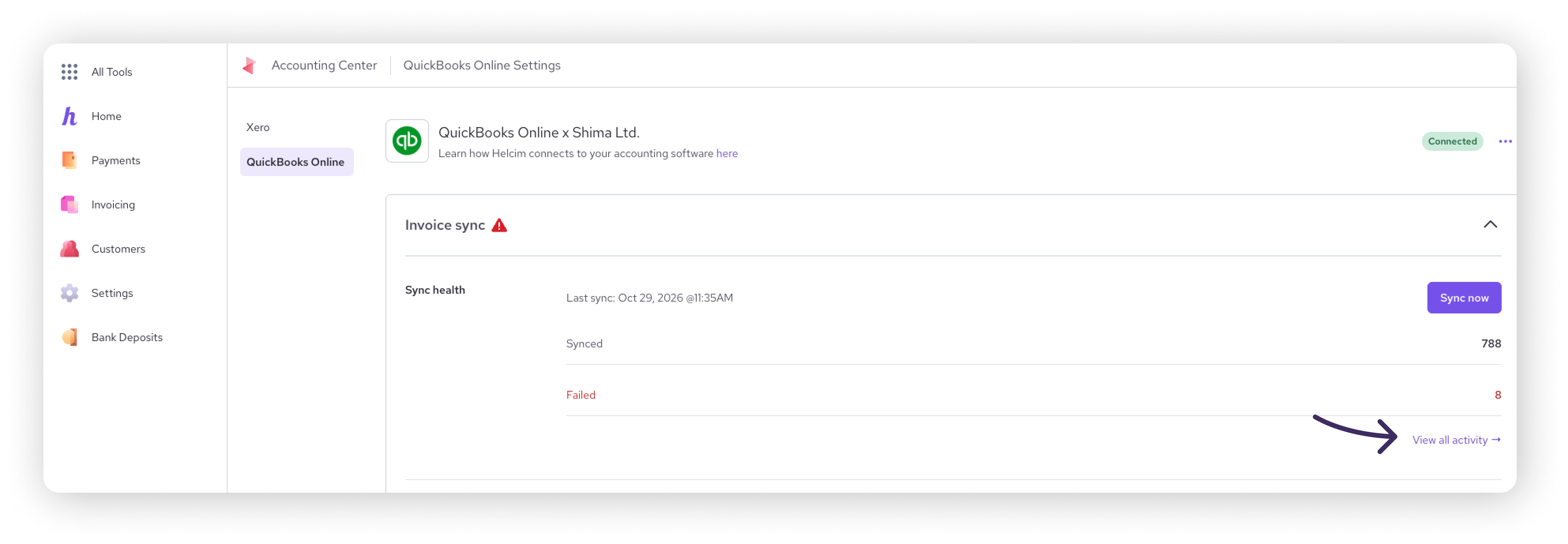
Your QuickBooks Online Settings page is your first stop for any sync question. Sync health shows when the last sync ran and how many records synced or failed. For the details, Activity sync lists your invoices and customers separately, where each one came from (Helcim or QuickBooks Online), its status, and when it last synced. If something failed, it shows you why.
Go to All Tools > Accounting Center, then select QuickBooks Online.
In the Invoice sync section, check Sync health for failed records.
Select View all activity to open Activity sync.
Find the invoice or customer and check its status.
If it failed, fix the issue (usually in QuickBooks Online), then select Retry. To resend every failed record at once, select Retry all.
A failed invoice row showing its failure reason
Retry and Retry all buttons highlighted
An invoice didn't import into Helcim
New invoices usually arrive in Helcim within about a minute. If one is missing, it's most often one of these:
If the invoice is already paid, this is expected. Only invoices with a balance due are imported.
If the invoice number is already used in Helcim, change the invoice number in QuickBooks Online, then retry.
If the invoice total is zero or negative, correct it in QuickBooks Online so the total is above zero, then retry.
If you see a QuickBooks Online error you don't recognize, retry once. If it fails again, contact support.
An imported invoice total doesn't match QuickBooks Online
A few kinds of invoice details are handled differently in Helcim:
Deposits: Deposits on QuickBooks Online invoices aren't supported. The deposit doesn't carry over to Helcim, so the totals won't match. For example, a $100 invoice with a $15 deposit shows $85 due in QuickBooks Online but $100 in Helcim.
Negative lines: A negative line is fine as long as the invoice total is above zero. For example, an invoice with a $50 line and a -$10 line imports with a $40 total, plus tax. Negative quantities import as positive.
Negative tax lines: These aren't imported.
Quantities with more than 2 decimal places: These are rounded to 2 decimals if you save the invoice in Helcim, which can change the line and invoice totals.
| Don't add deposits to QuickBooks Online invoices you plan to collect through Helcim. Your customer could be charged the full invoice amount in Helcim. |

| If your invoices use precise quantities, like hours billed to the minute, make your edits in QuickBooks Online instead of Helcim to avoid rounding. |

The Fee Saver line is missing, or my customer has a credit
When a customer pays by credit card with Fee Saver on, the fee is added to the QuickBooks Online invoice as its own line before the payment is recorded. If that line is missing, the extra amount your customer paid can show up as a credit in QuickBooks Online.
The most common cause is that no Fee Saver Income account is selected.
Check that Fee Saver is turned on in your Helcim settings, and that your default payment methods for Invoicing include both Credit Card and ACH.
On the QuickBooks Online Settings page, open Invoice sync and check that an account is selected in the Fee Saver section.
Open Activity sync and retry the invoice.
If the income account is set and the line is still missing, check whether the invoice was emailed before Fee Saver was set up, or whether the customer has Auto-Collect on. Fee Saver isn't added in either case. If none of these apply, contact support.
| Fee Saver doesn't apply to Auto-Collect payments, so you won't see a Fee Saver line on invoices collected that way. |

An edit didn't sync
With two-way sync, the last edit wins: whichever platform you changed most recently is the one that sticks. A few things to keep in mind:
Once an invoice is paid in Helcim, changes made in QuickBooks Online won't update the Helcim invoice.
Some fields stay in QuickBooks Online, like the item's account and class or location. Helcim never changes these.
Taxes are managed in QuickBooks Online. To change tax on a synced invoice, make the change in QuickBooks Online.
If you edited the same invoice in both places at almost the same time, check which edit was last, then make the change again if needed.
If none of these apply, check Activity sync for the invoice and retry. Still not syncing? Contact support.
My customer didn't get an invoice email
If Send emails to customers is on, Helcim emails your customer a payment link the first time an invoice is imported. The email only sends if:
The invoice is due and has an invoice number.
The QuickBooks Online invoice has a Bill To email address. This is the address used, not the email on the customer's profile.
Editing an invoice after it's imported doesn't send another email. To send it again, send the invoice from Helcim.
A refund or credit didn't sync
Refunds and credits don't sync between Helcim and QuickBooks Online.
Refunds: If you refund a payment in Helcim, record the refund in QuickBooks Online manually.
Credits: A credit applied to an invoice in QuickBooks Online isn't applied in Helcim, so the invoice imports at its full amount.
I can't connect or reconnect
If you disconnected before and can't reconnect, Helcim may still be connected on the QuickBooks Online side.
In QuickBooks Online, go to Apps > Connected Apps.
Remove Helcim Automated Invoice Payments.
Go back to Helcim and connect again.
Still stuck? Contact support
Contact our support team and include:
The invoice number or numbers
A screenshot of the QuickBooks Online invoice
The status shown in Activity sync
What you've already tried, including any retries
FAQ
Can anyone on my team retry a failed sync?
Yes. Anyone with access to your Helcim account can retry one or all failed records from Activity sync.
Why did an invoice import after I edited it in QuickBooks Online?
Editing an invoice in QuickBooks Online triggers an import of that invoice. This is expected.
Why doesn't the payment in QuickBooks Online match my bank deposit?
Payments are recorded at the full amount your customer paid. Your bank deposit is net of processing fees. To track the difference, see Accounting process for net billing in QuickBooks Online.
I marked an invoice paid in QuickBooks Online. Why don't I see the payment in Helcim?
The invoice status updates to Paid in Helcim, but the payment itself is only recorded in QuickBooks Online.