When you ask customers for tips, suggested percentages can be calculated from either the pre-tax subtotal or the post-tax total. This choice gives you control over your checkout experience and keeps your business compliant with local tax laws. This guide will walk you through how tip calculations work, why pre-tax tipping matters, and how to update your device settings in just a few taps.
Understanding tip calculation options
When setting up tip prompts on your Helcim payment devices, you can choose between two methods for calculating suggested tip percentages:
Calculation method | How it works | What the customer sees |
Pre-tax calculation | Suggested tip percentages are calculated strictly from the subtotal before sales taxes are applied. | On a $100 subtotal with a 15% tip suggestion, the customer sees a proposed tip of $15.00. |
Post-tax calculation | Suggested tip percentages are calculated from the final total after sales taxes are added. | On a $100 subtotal (~15% Quebec tax added), a 15% tip suggestion calculates on $115, proposing a tip of $17.24. |
Why pre-tax tip calculation matters
Switching to pre-tax tipping changes how tip prompts display on your customer-facing screen. Here is what that change means for your business:
Clear and transparent checkout
Calculating tips before tax makes the math simple and predictable. When customers see a 15% tip prompt on a $100 bill, they expect $15. Basing percentages on post-tax amounts can catch customers off guard, leading to confusion or hesitation at the terminal. Pre-tax calculations eliminate surprises and build long-term trust with your patrons.
Consistency across locations
Tax rates vary significantly between provinces and states. Using pre-tax tip calculations ensures that a 15% or 18% tip suggestion feels uniform to your customers regardless of local tax rates or multi-location setups.
| Quebec Bill 72 compliance: If your business operates in Quebec and accepts tips, you must enable pre-tax tip calculation. Bill 72 requires terminal tip prompts to be calculated on the pre-tax subtotal. Turning this setting on keeps your business fully compliant. |

Where this feature is available
You can configure pre-tax tip calculations on the following Helcim devices:
Smart Terminal 1 and 2 (standalone mode)
Card Reader Gen 3 (standalone mode)
Card Reader Gen 2 (paired with iOS, Android, or Workstation App)
| Paired/Push mode for Smart Terminals and Card Reader Gen 3 does not currently support this feature due to technical constraints. |

How to configure tip calculation
Select your device below to update your tipping preference.
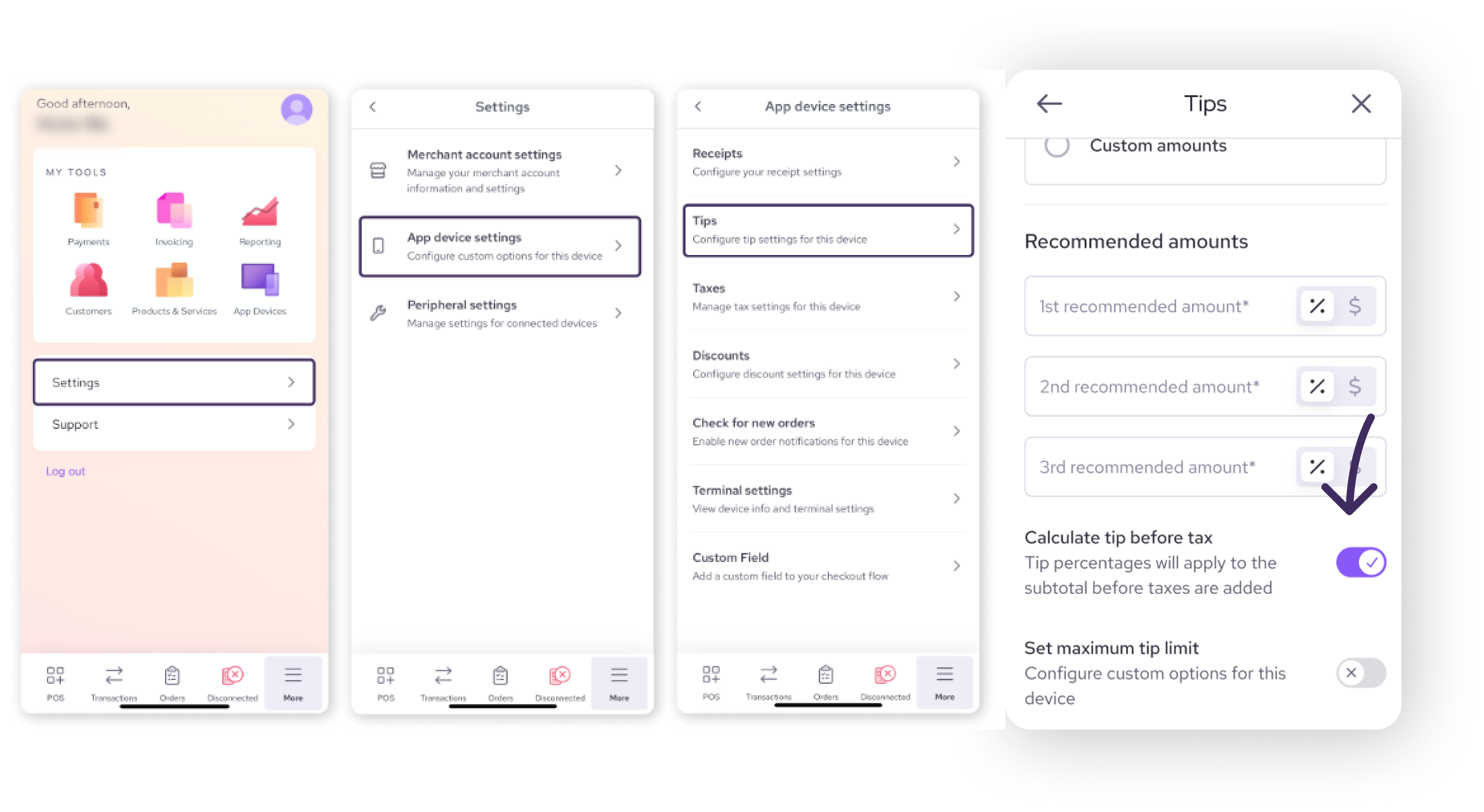
Smart Terminal 1 or 2 (standalone mode)
Tap More from the bottom menu.
Tap Settings > App Device Settings > Tips.
Toggle on Calculate Tip Before Tax.
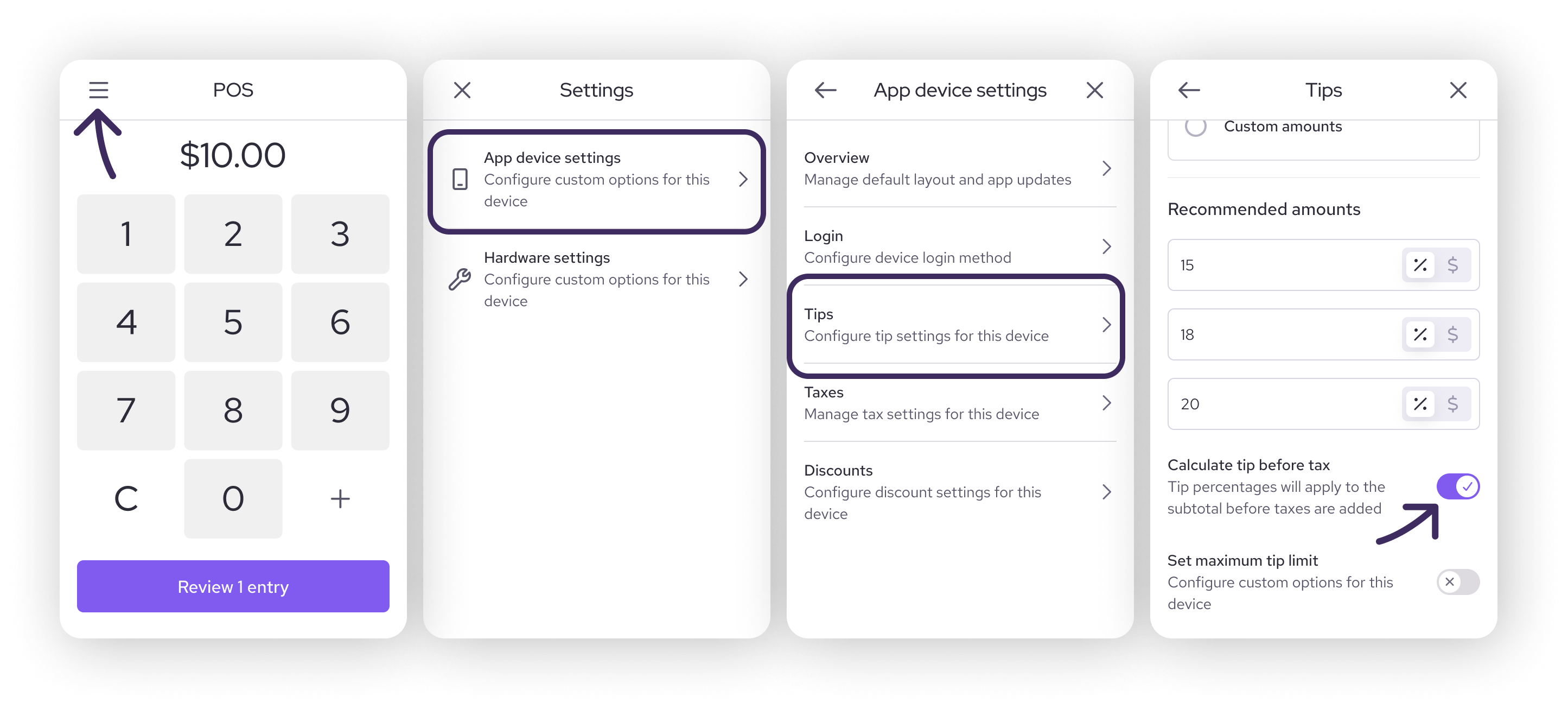
Card Reader Gen 3 (standalone mode)
Tap Settings > App Device Settings > Tips.
Toggle on Calculate Tip Before Tax.
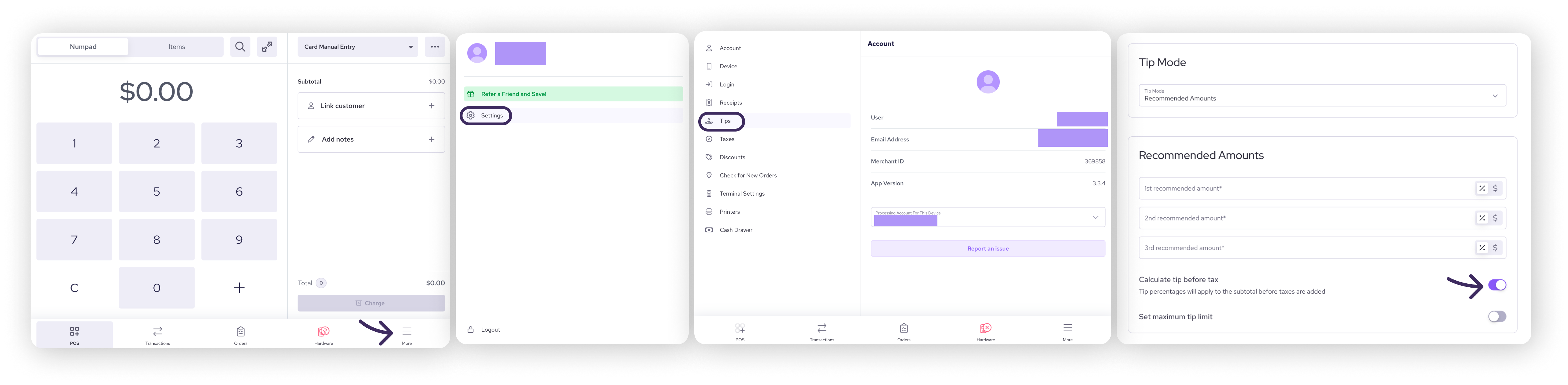
Workstation App (paired with Card Reader Gen 2)
Select More from the bottom menu.
Select Settings > Tips.
Toggle on Calculate Tip Before Tax.
Android or iOS app (paired with Card Reader Gen 2 or Tap to Pay)
Tap More from the bottom menu.
Tap Settings > App Device Settings > Tips.
Toggle on Calculate Tip Before Tax.
How customers see tips at checkout
Here is a quick look at how pre-tax vs. post-tax calculations appear to a customer on a $100 purchase (assuming a ~15% tax rate):
Calculation method | 15% suggestion | 18% suggestion | 20% suggestion |
Pre-tax | $15.00 | $18.00 | $20.00 |
Post-tax | $17.24 | $20.68 | $23.00 |
Note: Customers always retain the option to enter a custom tip dollar amount or percentage at checkout.
Impact on receipts and reporting
Changing this setting only changes how suggested tip amounts are calculated. Here is what stays the same and what changes:
Final tip display: The total tip collected displays normally on customer receipts.
Tax calculation: Sales taxes are calculated accurately based on your account tax settings, independent of tipping.
Reporting: You can view and reconcile tip amounts collected over any date range by visiting your Transaction Details Report.
Next steps
Set up default tip percentages: Learn how to adjust your preset tipping percentages in our guide to enabling and configuring tips in the Helcim POS app.
Review regional taxes: Ensure your provincial or state tax settings are up to date by reviewing how to configure tax rates for payments.
Audit transaction history: Learn how to analyze overall tip volume using our guide to tracking sales and credit card transactions.
FAQs
Does changing this setting affect past transactions?
No. This setting only applies to new transactions made after the change. Historical reporting and past transaction totals remain unchanged.
Can I use different calculation methods on different devices?
Yes. While your app sets default rules, individual terminals and card readers can override this setting. If you operate in Quebec, make sure all devices at that location are toggled to pre-tax calculations.
What if I'm unsure whether Bill 72 applies to my business?
If your business operates in Quebec and accepts tips on card transactions, Bill 72 applies to you. For specific legal questions about your business setup, consult a local compliance advisor or refer to official Quebec legislation.
If I'm not in Quebec, should I still use pre-tax calculation?
That choice is completely up to you! Many merchants outside Quebec choose pre-tax calculations because customers appreciate the clear, straightforward math.
Can I change this setting back at any time?
Yes. You can switch between pre-tax and post-tax calculations at any time in your device settings. Updates take effect immediately.