We know taxes aren’t the most thrilling topic, but understanding how they work on your payment tools is crucial for keeping your business running smoothly.
This guide covers the basics of how Helcim handles tax calculations, where automation ends, and what you need to manage yourself.
In this article
Default tax rates vs. custom rates
When you first open your Helcim account, you will find default tax rates already set up in your settings. This means you can start taking payments right away, but we strongly recommend checking them first.
| These default rates are not "live," so they won't update automatically if the government changes the sales tax. |

It is a good idea to double-check that they match the current rates for your region. You can always edit these rates or add new ones to fit your business needs.
When are taxes applied automatically?
Helcim can calculate taxes during checkout, but it works differently depending on the tool you use.
Helcim POS app: This is the only tool that can add taxes automatically. You can change your app settings to add taxes to every sale, or set them to "Optional" so your staff can turn them on or off.
All other payment tools: For tools like Invoicing or the Virtual Terminal, taxes are not added automatically. When you create an invoice or key in a payment, you will see an empty tax field. You must click Add and select the correct tax location yourself.
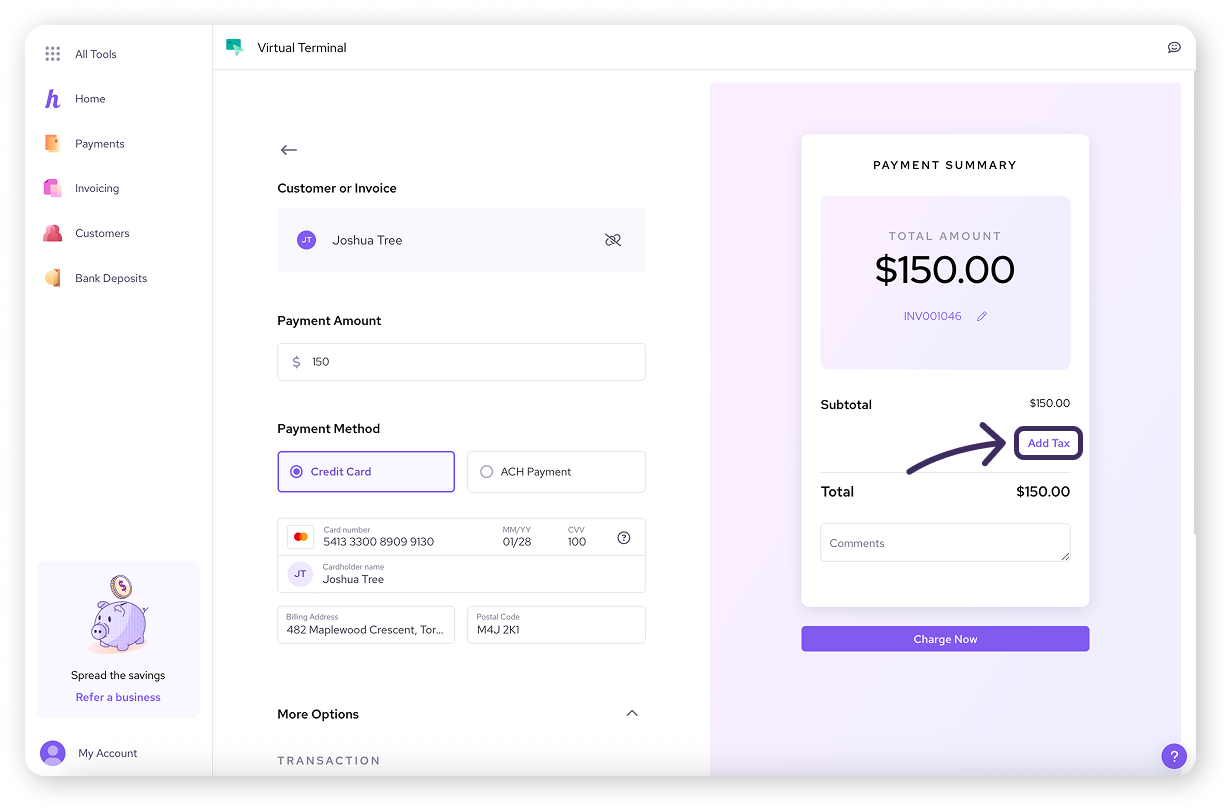
Adding a tax to the Virtual Terminal
Reporting and compliance
Helcim helps you calculate and collect taxes, but we do not report or remit them for you.
We help you calculate: We apply the rates from your settings to your transactions.
We help you track: You can see exactly what you have collected in your Taxes Summary report.
You handle the rest: It is up to you to file your taxes with the tax authority (like the CRA or IRS).
Next steps
Now that you understand the basics, you are ready to set up your specific rates.
| To learn more, visit our next article: Set up your tax rates. |

FAQs
Do I need to set up taxes before I can start taking payments?
Technically, no. The system has default rates so you can process payments immediately. However, we highly recommend checking these rates first to make sure they are correct for your region.
Does Helcim automatically update rates if the government changes them?
No. The default rates in Helcim are not "live." If a tax rate changes in your province or state, you must update the rate in your settings manually.
What happens if I sell to customers in another province or state?
For Canadian merchants:
If you ship items to a customer in another region, you usually need to apply their local tax rate to the invoice.
If you provide the service in your home region, you generally apply your local tax rate.
For US merchants:
Sales tax rules in the US can be complex.
Some states are "origin-based" (charging tax based on where you, the seller, are located), while others are "destination-based" (charging tax based on where the buyer receives the product).
We recommend consulting with a tax professional or accountant to determine which setting is compliant for your specific business and state.